You deployed a Consent Management Platform (CMP) like OneTrust, Cookiebot, or Usercentrics to maintain strict compliance with the EU Digital Markets Act (DMA) and GDPR.
Overnight, your GA4 recorded sessions dropped by 35%. Worse, your Google Ads conversion volume fell off a cliff.
Within days, Google Ads Smart Bidding algorithms began throttling your highest-performing Target CPA and Target ROAS campaigns. The bidding engine assumed your checkout conversion rate had cratered, prompting it to pull back bids, shed traffic, and spike your blended customer acquisition costs (CAC).
When we audit measurement foundations at Choozr, this is the single most common implementation disaster we encounter: brands are caught in a false dichotomy between regulatory compliance and marketing telemetry.
The issue is rarely your ad strategy or your product. The breakdown stems from a misconfigured Google Consent Mode v2 setup that breaks session stitching, starves bidding algorithms, and introduces critical race conditions into your Google Tag Manager (GTM) container.
Here is how to audit your Consent Mode v2 architecture, properly choose between Basic and Advanced implementations, and resolve the underlying technical failures.
Section 1: The Business & Revenue Risk of Consent Misconfigurations
Treating consent management purely as a legal checkbox rather than a critical data infrastructure project creates severe revenue liabilities.
When Google Ads Smart Bidding operates without conversion signals, its underlying machine-learning models cannot differentiate between a non-converting click and a paying customer who simply opted out of marketing cookies.
[User Opts Out of Cookies] ──x [Hard Tag Blocking (Basic Mode)] ──x [Zero Signal Transmitted]
                                                                            │
                                                                   [Smart Bidding Throttles]
                                                                            │
                                                                 [-35% Campaign Volume / High CAC]
The Mathematics of Basic vs. Advanced Consent Mode
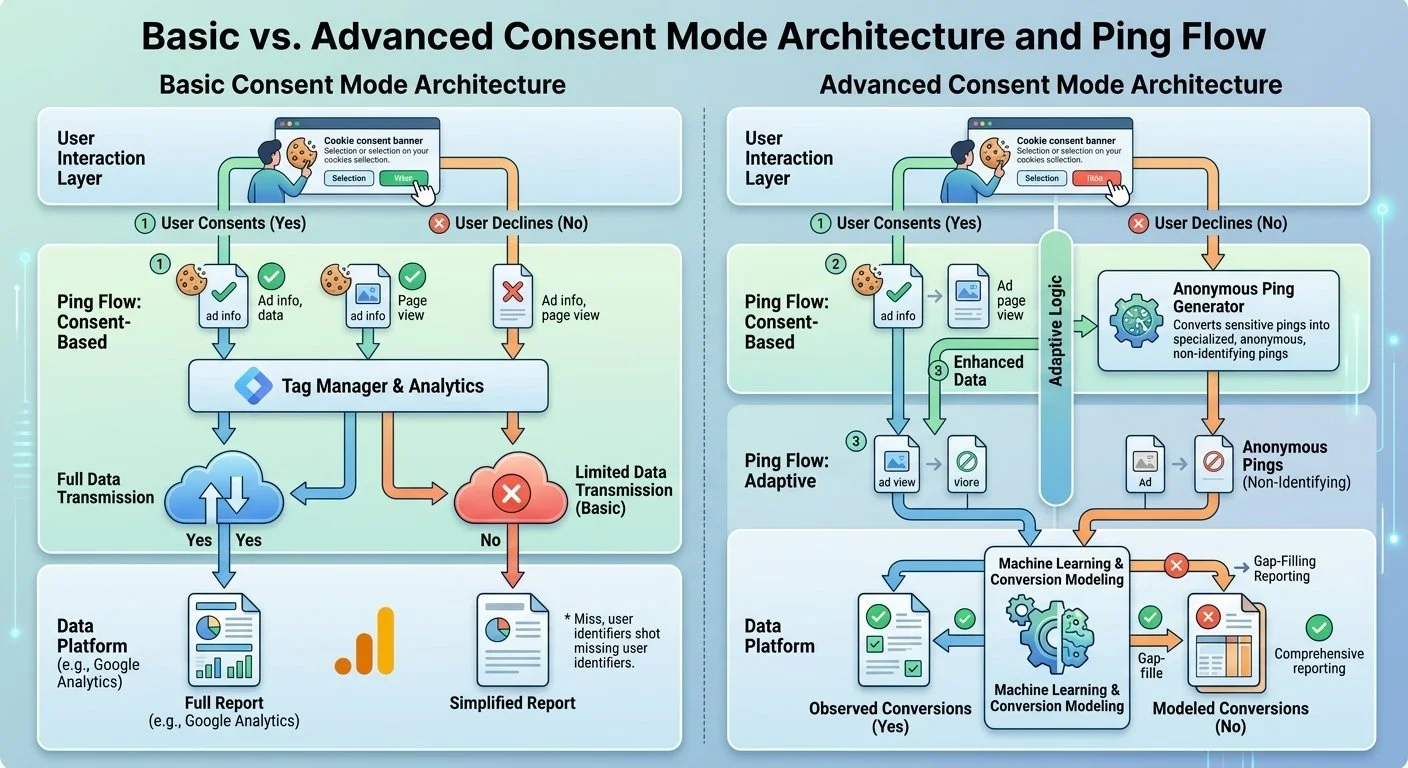
Basic Consent Mode: All Google tags (GA4, Google Ads Conversion Tracking, Floodlight) are entirely blocked from loading until the user explicitly clicks "Accept" on your banner. If 30% of your audience rejects or ignores the banner, you permanently lose 30% of your top-line measurement data. No cookieless pings are sent. Google cannot apply AI-driven conversion modeling or behavioral modeling, leaving your attribution models permanently fragmented.
Advanced Consent Mode: Google tags load dynamically before the user interacts with the banner, but with consent states explicitly set to denied (ad_storage='denied', analytics_storage='denied'). Tags transmit cookieless, non-identifying pings. If consent is granted, the tags update dynamically and attach full cookie identifiers. If consent is denied, Google's machine-learning engine utilizes those cookieless pings to model conversions and sessions across GA4 and Google Ads—recovering up to 70% of lost conversion attribution while remaining fully compliant with DMA and GDPR guidelines.
+------------------------------------+----------------------------------+----------------------------------+
| ATTRIBUTE                          | BASIC CONSENT MODE               | ADVANCED CONSENT MODE            |
+------------------------------------+----------------------------------+----------------------------------+
| Tag Execution on Page Load         | Blocked until user accepts       | Fires immediately in denied state|
| Cookieless Pings Transmitted       | No (Complete data blackout)      | Yes (Privacy-safe pings sent)    |
| GA4 Behavioral Modeling Support    | No                               | Yes                              |
| Google Ads Conversion Modeling     | Minimal / None                   | Full machine-learning recovery   |
| Regulatory Alignment               | Compliant (Over-restrictive)     | Fully Compliant (DMA/GDPR)       |
+------------------------------------+----------------------------------+----------------------------------+
Choosing Basic Mode or misconfiguring Advanced Mode starves your paid media bidding infrastructure of the raw data required to deploy capital efficiently.
Section 2: Technical Breakdown of the 3 Core Failure Points
When Consent Mode v2 deployments degrade analytics and ad tracking, the root cause typically falls into one of three technical buckets:
[1. Architecture Misalignment] ──> [2. GTM Script Race Conditions] ──> [3. Missing v2 Signals]
         (Basic vs Advanced)              (Asynchronous CMP Timing)          (ad_user_data / ad_personalization)
1. Basic vs. Advanced Architecture Misalignment
Make it stand out
Many engineering teams inadvertently default to Basic Consent Mode by setting GTM tag-firing triggers to evaluate whether an opt-in consent event (e.g., cookie_consent_update or OneTrustGroupsUpdated) has occurred before firing Google tags.
By hard-blocking the Google Tag (gtag.js) from executing on initial page load, you eliminate the tag's ability to evaluate Google's Built-in Consent Checks. The tag never initializes in a denied state, preventing Google's servers from receiving the cookieless baseline pings required for AI conversion modeling.
2. Asynchronous CMP Execution and GTM Script Race Conditions
This is the primary cause of sudden surges in GA4 (Unassigned) traffic and broken session attributions.
Consent Management Platforms frequently load asynchronously via third-party scripts. If your GTM container initializes and your GA4 Configuration / Google Tag fires before the CMP script evaluates and pushes the gtag('consent', 'default', ...) command to the DOM, the Google tag executes with standard cookie-setting behaviors or an uninitialized consent state.
Race Condition Timeline:
[T0: GTM Loads] ──> [T1: GA4 Config Fires (Missing Consent State)] ──> [T2: CMP Sets Consent Default (Too Late)]
                                                                               │
                                                                   [Broken Attribution / Unassigned Traffic]
When the CMP finally loads 300ms later and sets the default state to denied, GA4 immediately fragments the session. The original hit has a gcs parameter that contradicts subsequent hits, forcing GA4 to discard the source/medium campaign attribution and bucket the user under (Unassigned).
3. Missing ad_user_data and ad_personalization Signal Mapping
Consent Mode v2 introduced two mandatory parameters beyond legacy v1 keys (ad_storage and analytics_storage):
ad_user_data: Governs whether user data (e.g., hashed email, phone number from Enhanced Conversions) can be sent to Google for advertising purposes.
ad_personalization: Governs whether data can be used for personalized advertising, such as remarketing lists and dynamic audience targeting.
If your CMP template or custom dataLayer integration does not explicitly set and update these two v2 keys, Google Ads automatically flags the conversion payload as non-compliant under DMA regulations. It silently rejects your Enhanced Conversions payloads and stops populating first-party audience segments for Smart Bidding.
Section 3: Step-by-Step Technical Fix & Audit Routine
Follow this step-by-step implementation routine to resolve race conditions, restore conversion modeling, and audit your Consent Mode v2 health.
+-----------------------------------------------------------------------------------+
|                       CONSENT MODE v2 AUDIT & FIX ROUTINE                         |
+-----------------------------------------------------------------------------------+
| Step 1: Inject hardcoded gtag default states directly in the document <head>      |
| Step 2: Configure GTM Built-In Consent Checks (Remove custom blocking triggers)   |
| Step 3: Audit Network Requests via Chrome DevTools (Validate gcs and gcd strings) |
+-----------------------------------------------------------------------------------+
Step 1: Eliminate Race Conditions by Hardcoding Default Consent in the <head>
Do not rely on asynchronous GTM tags or delayed CMP templates to set your initial default consent state. Hardcode the default consent configuration directly in your website's raw HTML <head>, placed above the GTM container script:
<!-- 1. Define dataLayer and gtag -->
<script>
  window.dataLayer = window.dataLayer || [];
  function gtag(){dataLayer.push(arguments);}

  // 2. Set default consent state BEFORE GTM loads (Advanced Mode Setup)
  gtag('consent', 'default', {
    'ad_storage': 'denied',
    'analytics_storage': 'denied',
    'ad_user_data': 'denied',
    'ad_personalization': 'denied',
    'wait_for_update': 500 // Gives CMP up to 500ms to update state before tags fire
  });
</script>

<!-- 3. Google Tag Manager Container Script -->
<script>(function(w,d,s,l,i){w[l]=w[l]||[];w[l].push({'gtm.start':
new Date().getTime(),event:'gtm.js'});var f=d.getElementsByTagName(s)[0],
j=d.createElement(s),dl=l!='dataLayer'?'&l='+l:'';j.async=true;j.src=
'https://www.googletagmanager.com/gtm.js?id='+i+dl;f.parentNode.insertBefore(j,f);
})(window,document,'script','dataLayer','GTM-XXXXXXX');</script>
By specifying wait_for_update: 500, you instruct Google tags to hold outgoing network pings for up to 500 milliseconds, allowing your CMP to resolve the user's stored consent choices and issue an update command without causing script blocking.
Step 2: Configure Built-In Consent Checks in GTM
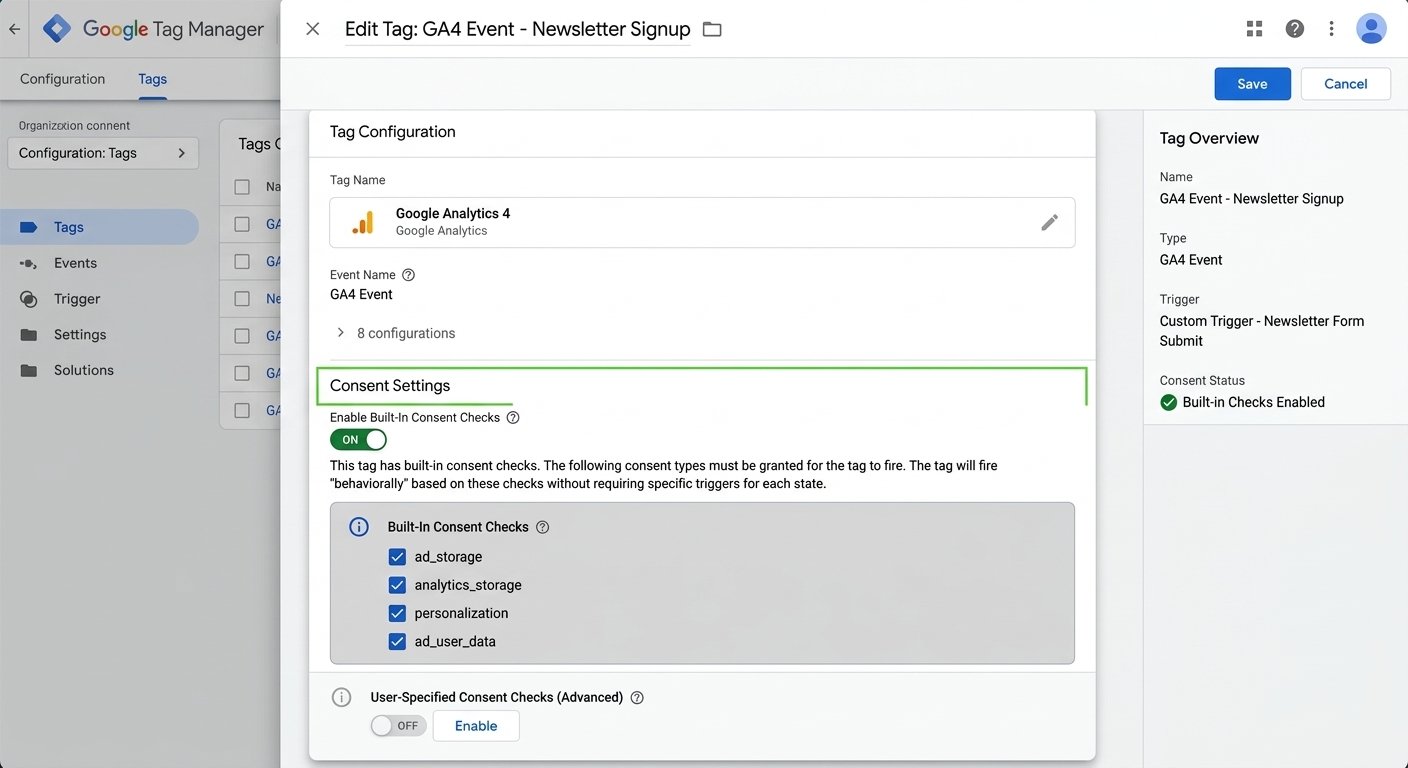
In Google Tag Manager, verify that your Google tags leverage Google's native consent checks rather than custom trigger-blocking logic:
Open your Google Tag (GA4 Configuration) or Google Ads Conversion Tag.
Navigate to Advanced Settings → Consent Settings
Confirm that Built-in Consent Checks are active (Google tags automatically recognize ad_storage, analytics_storage, ad_user_data, and ad_personalization).
Set Additional Consent Checks to "No additional consent required".
Set your tag trigger to standard Initialization - All Pages or Page View. Do not restrict the tag trigger to a custom CMP "Consent Updated" trigger if you are deploying Advanced Consent Mode.
Step 3: Validate Network Payloads via Chrome DevTools & GA4 DebugView
To verify that your consent signals are transmitting correctly, open Chrome DevTools (Cmd + Option + I or Ctrl + Shift + I), navigate to the Network tab, and filter requests by collect?v=2 (for GA4) or /pagead/ (for Google Ads).
Network Tab URL Query Inspection:
https://www.google-analytics.com/g/collect?v=2&...&gcs=G111&gcd=13r3r3r3r5...
                                                    │           │
                                                    │           └── gcd: Detailed signal lifecycle
                                                    └────────────── gcs: High-level storage status
Inspect the query parameters:
1. The gcs Parameter (Google Consent Status)
This 4-character string follows the format G1xy:
x corresponds to ad_storage
0=denied,1=granted0=denied,1=grantedy corresponds to analytics_storage
0=denied,1=granted0=denied,1=granted
Examples:
gcs=G100: Both Ad Storage and Analytics Storage are denied (cookieless ping state).
gcs=G111: Both Ad Storage and Analytics Storage are granted (full tracking active).
gcs=G101: Ad Storage is denied, Analytics Storage is granted.
2. The gcd Parameter (Google Consent Default and Update State)
The gcd string tracks the status of all four consent types (ad_storage, analytics_storage, ad_user_data, ad_personalization), indicating whether each was set by default or updated by the user.
Ensure the gcd parameter reflects updated values (e.g., containing r or q characters representing granted states) after accepting the CMP banner.
[Insert Screenshot: Chrome DevTools Network Tab filtering for gcs and gcd query parameters on collect hits]
Finally, open GA4 Admin → DebugView, click on any incoming event hit, and navigate to the Consent tab to verify that the consent dimensions match the user's explicit interaction.
Build Resilient Privacy & Measurement Foundations
Consent Mode v2 is not a barrier to growth—it is the modern standard for privacy engineering. When configured correctly, it protects your brand from severe regulatory penalties while feeding Google's machine learning models the modeled data required to scale paid campaigns predictably.
At Choozr, we engineer durable data foundations. Through our Choozr Foundations service, we design, deploy, and audit server-side tracking, advanced consent architectures, and resilient data layers that build in-house technical capability for your marketing and engineering teams.
Are broken consent scripts distorting your marketing performance?
Book a Free Strategy Audit at choozr.co and let our measurement engineers audit your tracking infrastructure.
